
Download CGO4 – aerial photography, drone camera, 4K video, remote control, professional video, Android app
Overview
The CGO4 app is a dedicated Android application designed for use with the Tornado H920, a professional multirotor aerial photography and videography platform. Engineered to support the CGO4 camera system, the software serves as a central interface for controlling and managing aerial imaging operations. Its primary purpose is to enable users to capture high-quality visual content from elevated perspectives, supporting both still photography and dynamic video recording. The app is tailored for professionals and serious enthusiasts involved in cinematography, surveying, real estate documentation, and event coverage who require reliable, high-resolution output.
By integrating a super far-range Wi-Fi link, the CGO4 app ensures stable connectivity between the mobile device and the drone’s camera system, minimizing signal loss during operation. This connectivity supports real-time video streaming and remote adjustments, allowing for precise control over imaging parameters. The app facilitates a seamless workflow for users who demand professional-grade results without the complexity of fragmented tools. While the developer, Tornado, has not provided additional background on their broader product ecosystem, the app’s design suggests a focus on specialized drone-based imaging solutions.
Key Features & Capabilities
- 4K Video Recording: Enables the capture of ultra-high-definition video footage, ideal for cinematic production and detailed visual documentation.
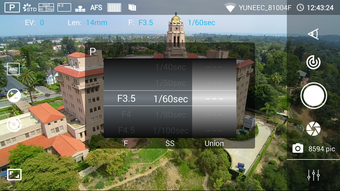
- Remote Camera Control: Offers real-time adjustments to exposure, sensitivity (ISO), white balance, and shutter speed, allowing for fine-tuned image quality under varying lighting conditions.
- Extended Wi-Fi Connectivity: Features a super far-range Wi-Fi link designed to maintain stable communication between the mobile device and the drone’s camera system, even at significant distances.
- Seamless Integration with Tornado H920: Optimized specifically for the CGO4 camera and Tornado H920 drone, ensuring reliable performance and consistent user experience.
- Real-Time Video Preview: Provides a live feed from the camera, enabling users to frame shots accurately and monitor visual output during flight.
These capabilities support a wide range of professional applications, including aerial cinematography, infrastructure inspection, and large-scale event coverage. The ability to adjust exposure settings on the fly ensures consistent image quality across diverse environments, from bright daylight to low-light conditions. The real-time preview enhances situational awareness and helps operators make informed decisions during flight, improving overall shot accuracy and efficiency.
User Interface, Workflow & Performance
The user interface of the CGO4 app is designed with functionality and clarity in mind, prioritizing accessibility for users engaged in high-stakes aerial operations. Navigation is structured around core functions such as video preview, camera settings, and flight controls, allowing for quick access to essential tools. The layout supports intuitive interaction, minimizing the learning curve for experienced drone operators while maintaining a clean, distraction-free environment.
Workflow efficiency is enhanced through direct integration with the Tornado H920’s camera system, enabling users to switch between photo and video modes with minimal delay. The app’s performance is optimized for Android devices, though specific resource usage details were not provided. General observations suggest stable operation during typical use, with minimal lag in video streaming and control response. The developer did not specify CPU or RAM behavior under load, nor did they provide performance benchmarks. However, the app’s lightweight size of 45.6 MB indicates a streamlined design focused on core functionality rather than extensive background processes.
Compatibility & System Requirements
The CGO4 app is designed exclusively for Android operating systems and is compatible with devices running the specified OS version. It has a file size of 45.6 MB, which suggests a compact installation footprint suitable for most modern Android smartphones and tablets. The app is intended for use with the Tornado H920 drone and its CGO4 camera system, meaning compatibility is limited to this specific hardware ecosystem.
Exact system requirements were not listed, including minimum Android version, processor specifications, or memory thresholds. The developer did not provide additional information on hardware compatibility beyond the OS. As such, users should verify device suitability through official documentation or testing. The app’s design implies support for devices with stable Wi-Fi connectivity and sufficient processing power to handle real-time video streaming, but no specific benchmarks were shared.
Pros and Cons
Pros
- Optimized for professional aerial photography and videography with the Tornado H920
- Supports 4K video recording for high-resolution output
- Features a super far-range Wi-Fi link for stable remote connectivity
- Offers comprehensive manual camera controls for precise image tuning
- Free to download and use, reducing entry barriers for professionals
Cons
- Exclusive compatibility with Tornado H920 and CGO4 camera system
- No information on minimum Android version or hardware requirements
- Performance details such as CPU/RAM usage were not disclosed
- Limited to Android platform; no support for iOS or desktop systems
- Dependent on specific drone hardware for full functionality
FAQ Section
Is CGO4 available for iOS devices?
The CGO4 app is currently available only for Android operating systems. There is no official version for iOS devices.
Can I use CGO4 with drones other than the Tornado H920?
The app is specifically designed for use with the Tornado H920 and its CGO4 camera system. Compatibility with other drones has not been confirmed.
Is the app safe to download and use?
CGO4 is a legitimate application developed by Tornado for their drone platform. It is free to download and use, but users should ensure they obtain the app from official or trusted sources.
Does CGO4 require an internet connection to function?
No, the app operates via a direct Wi-Fi link between the mobile device and the drone’s camera system. An internet connection is not required for core functionality.
How often are updates released for CGO4?
Regular updates are likely to maintain compatibility and improve performance, though the frequency has not been publicly disclosed. Users are encouraged to check for updates through official channels.
Final Thoughts
The CGO4 app delivers a focused, professional-grade experience tailored to aerial imaging needs. Its integration with the Tornado H920 drone and CGO4 camera system provides a reliable platform for capturing 4K video and high-quality stills with advanced manual controls. The super far-range Wi-Fi link enhances operational flexibility, while the intuitive interface supports efficient workflow execution. Although the app is limited to a specific hardware ecosystem and lacks detailed system requirements, its core functionality is well-suited for professionals in cinematography, surveying, and event production.
For users invested in the Tornado H920 platform, CGO4 offers a seamless, free-to-use solution that elevates aerial content creation. While broader compatibility would expand its appeal, its specialized design ensures precision and reliability within its intended scope. The app stands as a capable tool for those seeking a streamlined, high-performance experience in drone-based visual storytelling.
Download CGO4 now






.png)
